A call to Cloudflare DNS API

My Unify USG still can’t handle Cloudflare Dynamic DNS, so I have to do it the hard way. Create a script to update the DNS records for me the same way I did for Google DNS in this post: https://tokmakov.me/2019/06/09/dynamic-dns-from-behind-a-router/

Luckily, the API is available, and it looks like this:

curl -X PUT "https://api.cloudflare.com/client/v4/zones/<my zone ID>/dns_records/<my dns record ID>" -H "Authorization: Bearer <your API access token>" -H "Content-Type: application/json" --data '{"name": "example.com", "type": "A", "ttl": 1, "content":"127.0.0.1", "proxied":false}'

You can find your zone ID on your cloudfare page for your site. As for the DNS record ID, you can get them by making another call (https://developers.cloudflare.com/api/operations/dns-records-for-a-zone-list-dns-records):

curl --request GET --url https://api.cloudflare.com/client/v4/zones/<your zone ID>/dns_records --header 'Content-Type: application/json' -H "Authorization: Bearer <your API access token>"

And you can get your access token as described here: https://developers.cloudflare.com/fundamentals/api/get-started/create-token/.
Including Schlage be469nx z-wave lock

I had a lot of trouble while moving the lock from VeraPlus to Hubitat. Hubitat would just not add the lock whatever I tried.

After reading multiple forums, I’ve found that combination of these steps would solve most of the problems.

  1. Don’t forget to exclude the lock! This is the most important thing. If pairing is not happening for no apparent reason, just try excluding the lock from your current controller. Mine was not indicating that it is included (it should blink its led when battery is attached, if it’s included into z-wave network). But it would fail to be included all the time, with different controllers. When I excluded it, everything started to be OK.
  2. Use fresh batteries. Even half-dead batteries would cause issues with pairing. My pairing issues started with this I believe.
  3. Be sure to have lock and controller in their final locations. If you move controller close to the lock (or vice versa), pair them, and then move it back, the lock (apparently) won’t be able to change the route to the controller. The lock needs to know the correct final z-wave route during pairing.
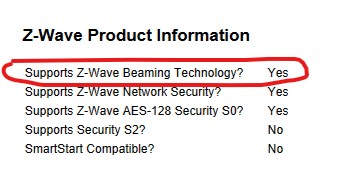
  4. If your lock is too far from controller, you’ll need to have a z-wave device nearby that supports beaming (most wired devices support it, except for old ones). You can find out which devices support beaming on https://products.z-wavealliance.org (for example: https://products.z-wavealliance.org/products/2306/embedpics). Beaming allows efficient communication with battery-powered devices.
    supportsbeaming

I did not need this, but it was mentioned on forums:

  1. See if lock’s firmware is new-ish. Seems like version 5.8 and above is OK (you can find firmware on lock’s sticker). Some people mentioned that Schlage would even send new locks if firmware is old and you ask them to reflash the lock.
  2. Try resetting the lock? But it doesn’t reset z-wave settings.